Discuss how you relate a string vertex to an integer internally.
Discuss how you relate a string vertex to an integer internally. (hint: USet)
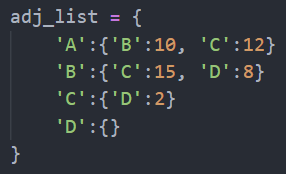
In python, there are what we call dictionaries, much like in hash tables, where we link a certain key to a value. This implementation of the adjacency list that I have in python uses dictionaries and they are much like modified USet, wherein there are no duplicates in the list, or in this case, the set. In this exercise, I relate (mapped) a string vertex to an integer by using dictionaries. I can map one key (a string) with a value (an integer). With Python, I can even make a key-value pair with the value a dictionary. An example is below.
Discuss how you dynamically add more vertices to the graph.
Discuss how you dynamically add more vertices to the graph. (hint: Array-based lists, resizing)
With Python’s dictionaries, I don’t need to resize. For once, I even though of creating the adjacency list with only lists, but dictionaries are more efficient because I would have to create a logic for checking duplicates if I where to use list. I don’t have to resize the adjacency list if I have to, when using Python. I dynamically add more vertices in the graph by just appending it in the dictionary of adjacency list as a key and target and weight (which is another key – value pair) as a value. I am only able to dynamically add more vertices easier because I am using Python. However, in most other languages such as C++ and Java, I would have to use array-based lists and resizing.
Perhaps we’d like to add more information to a vertex, how would we do that?
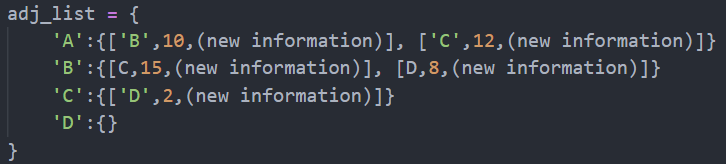
What I did here in my implementation is that if I where to add an edge (which consists of a source, target, and this case its weight), I would use a list as a pair or even a dictionary in this case. In the exercise, I mapped the key-value pair, with the key as the source pair as a dictionary which composed of target and its weight. However I can use a list for the pair like in the photo below. We also use just purely list in this graph but using dictionaries in python is more efficient.
Code Used:
# adj_list = {
#     'A':{'B':10, 'C':12}
#     'B':{'C':15, 'D':8}
#     'C':{'D':2}
#     'D':{}
# }

class Graph:
    def __init__(self):
        self.adj_list = {}

    def addEdge(self, i, j, w):
        if i in self.adj_list: # checks if the source i is in the adj_list dictionary
            if j in self.adj_list[i]: # if yes, and target is in the source, return False
                return 0
            else:
                self.adj_list[i].update({j:w}) # if yes, and target is not in the source, update that source with target and its weight
        else:
            self.adj_list[i] = {j:w} # if no source is seen, then add a new source, with its target and its weight
        return 1

    def removeEdge(self, i, j):
        if i not in self.adj_list: # if source is not in the adj_list, return False
            return 0
        del self.adj_list[i][j] # if source is there, delete that specific target with its respective source, and return True
        return 1

    def hasEdge(self, i, j):
        if i in self.adj_list: # checks if that source is in the adj_list
            if j in self.adj_list[i]: # if the source exist, checks if that target exist, then return True if found
                return 1
        return 0

    def outEdges(self, i):
        outEdges = [] # creates a list for all out edges
        weight = 0
        for source in self.adj_list[i]: # appends all the out edges and its corresponding weight in a list
            outEdges.append([source, self.adj_list[i][source]])
        for edge in outEdges: # for each out edges, adds all the total weight
            weight += int(edge[1])
        return weight

    def inEdges(self, i):
        inEdges = [] # creates a list for all in edges
        weight = 0
        for target in self.adj_list.values(): # checks all the source if target i exist
            if i in target:
                inEdges.append([i, target[i]]) # if yes, appends all the in edges and its corresponding weight in a list
        for edge in inEdges: # for each oinut edges, adds all the total weight
            weight += int(edge[1])
        return weight


# reading from input.dat
input_dat = []

with open('input.dat', 'r') as input:
    for line in input:
        input_dat.append(line.split())

# print(input_dat)

edges = input_dat[0][1:]

graph = [edges[i:i+3] for i in range(len(edges)) if i % 3 == 0]
test_cases = input_dat[2:]

# print(graph)
# print(test_cases)

# print()

adj_list = Graph()

# creating the edges
for edge in graph:
    adj_list.addEdge(edge[0], edge[1], edge[2])

# print(adj_list.adj_list)

# getting the output
for case in test_cases:
    # print(case)

    if case[0] == '1':
        print(adj_list.addEdge(case[1], case[2], case[3]))

    if case[0] == '2':
        print(adj_list.removeEdge(case[1], case[2]))

    if case[0] == '3':
        print(adj_list.hasEdge(case[1], case[2]))

    if case[0] == '4':
        print(adj_list.outEdges(case[1]))

    if case[0] == '5':
        print(adj_list.inEdges(case[1]))


# print(adj_list.adj_list['A']['C'])

# print(adj_list.adj_list.keys())
# print(adj_list.addEdge('A', 'C', 13))
# adj_list.removeEdge('A','C')
# print(adj_list.adj_list)

# print()

# print(adj_list.outEdges('A'))
# print(adj_list.inEdges('D'))
Sample Input
5 A B 10 B C 15 A C 12 B D 8 C D 2
5
2 A B
3 A B
4 A
1 A D 18
5 D
Sample Output
1
0
12
1
28 Chav's Blog